AI-Powered Forms

Keep control of your forms after they go live

Glow combines an AI form builder with shared form management, so your team can track what is live, manage submissions and follow changes in one workspace.

Create forms your team can manage over time. Glow helps you keep track of live forms, submissions, owners, and changes in one shared workspace.

Describe your form....
Shield icon with a checkmark symbol inside representing security or protection.
GDPR-native
Privacy by design
Icon of a gift box with a bow on top.
No per-seat pricing
With shared workspace
Blue globe icon showing a simplified world map with longitude and latitude lines.
EU-hosted
EU data residency
How it works

Build it, publish it, keep track

1

Build

Describe it to the AI or drag fields in. You get a working form in minutes.

2

Publish

Put it live, schedule it, or take it offline. No waiting on anyone with shared ownership of forms.

3

Keep track

Status, owners and submissions in one panel. Nothing sits forgotten in an inbox.

Give your forms the ultimate Glow-up

Most teams start with one form. Then five. Then fifty. Glow gives you one shared space to build, manage, and track. You always know what is live, who changed what, and what needs attention.

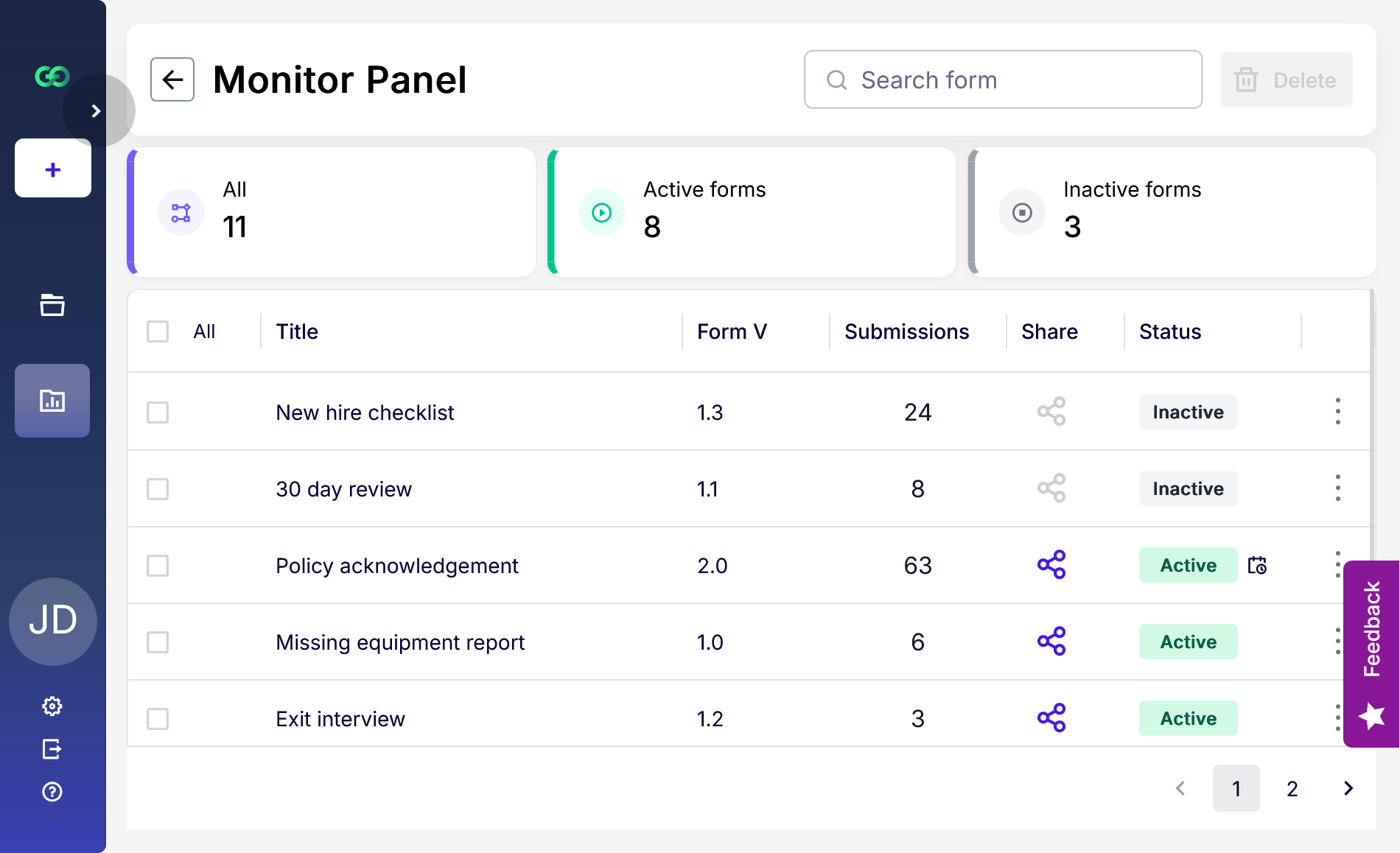
Know where every form stands

Forms are easy to create but hard to keep track of once several people, teams or locations depend on them. Glow gives your team one shared view of what's live, who owns what, and what has changed, so the tracking spreadsheet can finally go.
Every form's status at a glance, so nothing runs longer than it should
All submissions in one Monitor Panel, so answers stop hiding in inboxes
Shared ownership, so nothing is orphaned when someone leaves
Every change logged "who changed this?" takes seconds, not a meeting
Build with AI or drag-and-drop and publish it yourself.
Conditional logic shows only relevant questions, so users have less friciton
Form builder in Glow showing onboarding form with customizable fields and validation

Change it once, it updates everywhere
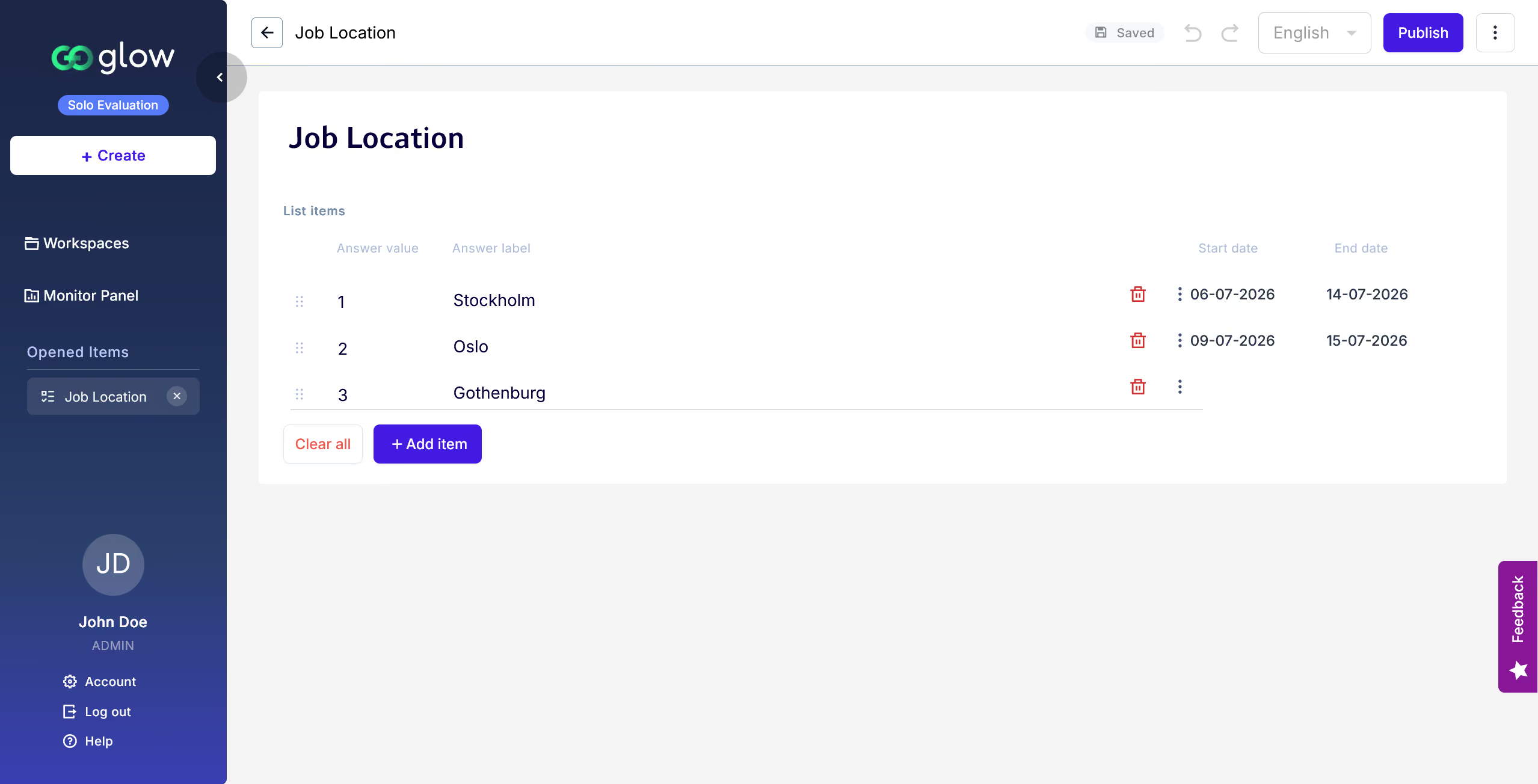
Lists hold shared options like locations, departments or time periods in one place, so your forms stay current without anyone editing them one by one.
One shared list across every form, so options never drift out of sync
Schedule items to open and close, so choices retire themselves on time
Update once instead of ten times, so small changes stay small
No outdated or duplicated choices, so respondents can't pick something that no longer exists
List builder in Glow displaying structured data entries with options to add and manage items
Coming Soon

After the submission, the work starts.
Workflows will turn submissions into structured next steps: process data, notify people, generate documents. In development, not yet live.
Turn submissions into clear next steps
Send automatic updates to respondents
Generate documents from submitted data
Reuse workflow templates for your team

‍See how Glow turns an idea into a working form

Start with a prompt and let Glow suggest the fields, questions and structure your form may need. Then refine it with drag-and-drop and publish a form your team can actually use and manage over time.

Generate, adjust and publish

See how to create your first structured form in under 2 minutes.

Forms are trust checkpoints

Glow powers digital forms for Norwegian municipalities through our partner KF, which offers the platform under the FriForm and Form+ brands.
Figures cover Glow deployments delivered through KF.
30+
Norweigan Municipalities
Using Glow through KF
300+
Shared Forms
Across organisations
50+
Daily Transactions
Growing Daily

Built for real world scenarios

Many forms need sensitive data collection and EU-hosting to be GDPR compliant. That's why all forms data in Glow always stays in the EU. So you can build great forms, for real world scenarios.
Automating form creation for business processes like job applications and access requests
Hiring and onboarding without the link hunt

Applications, onboarding, references, consent. Every form has an owner and a published version history. When the person who built it leaves, the form doesn't leave with them.

Creating surveys with conditional logic and dynamic follow-up question
Incident reports you can still find in a year

Deviations, near misses, inspections across sites. Reusable lists keep site names and categories the same everywhere, and version history shows who published each version and when.

Four raised keyboard keys arranged diagonally on a purple background: one yellow key with an orange branching arrow symbol, followed by three white keys with black mouse-pointer icons.
Applications that open and close on schedule

Courses, programmes, services. Set the dates when you publish instead of opening and closing forms by hand. Change a location or a programme name once and every form that uses it follows.

Become one of our pioneers!

We are currently in "Early Access" and we are looking for smart cookies like yourself to try Glow so we can use your feedback to make the best forms-engine yet.

Help us, help you, give your forms the ultimate glow-up
Sign up
100 free submissions per month